

 Image 1 of 1
Apparel Production Dashboard | Clothing Manufacturing Tracker & Excel Template
Apparel Production Dashboard | Excel Manufacturing Tracker
Manage your clothing production from start to finish, all in one organized spreadsheet.
Keeping track of multiple clothing styles, sample revisions, manufacturing deadlines, quality inspections, and shipments can quickly become overwhelming.
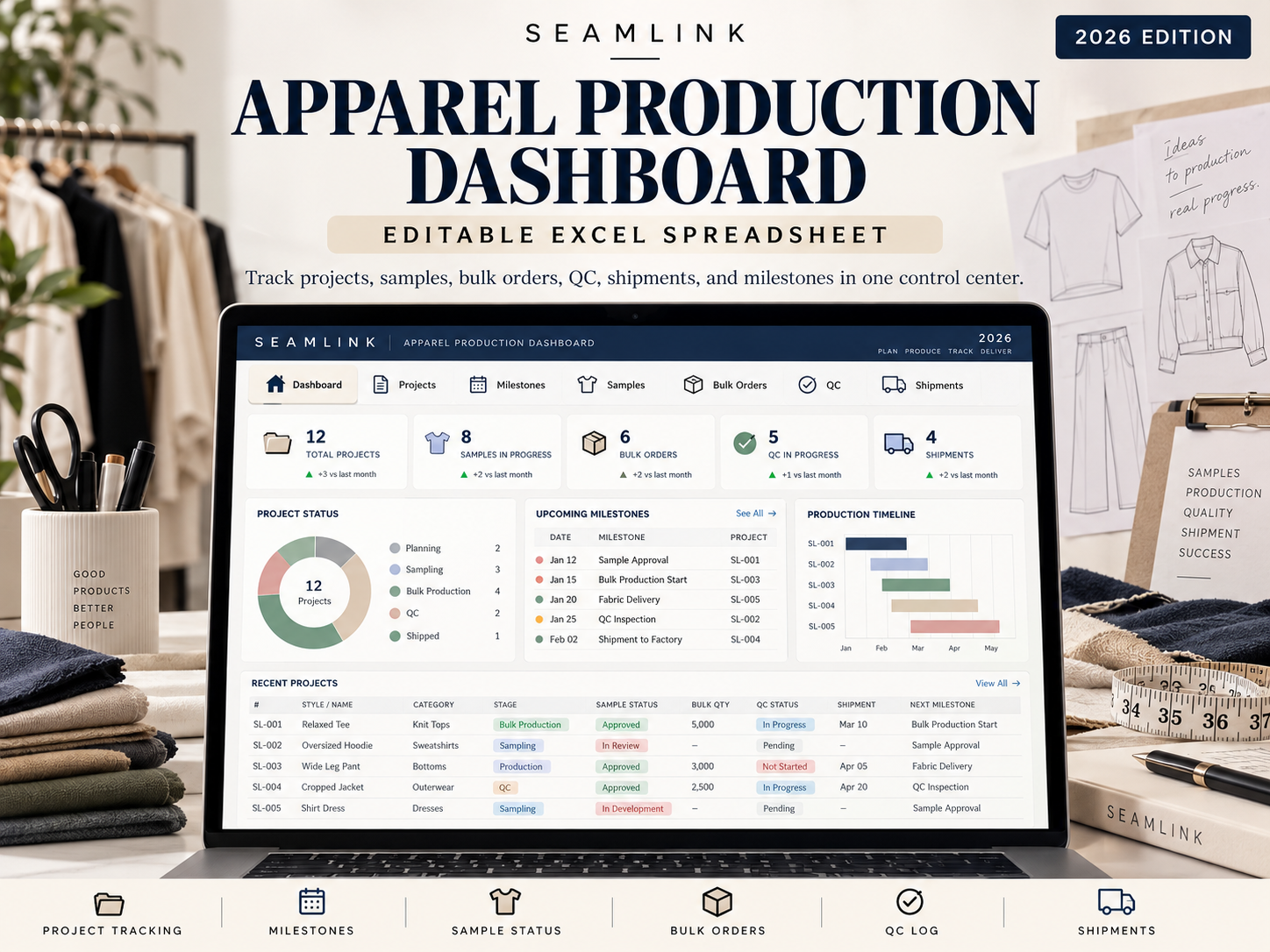
The SEAMLINK Apparel Production Dashboard is an editable Microsoft Excel workbook designed to help fashion brands, independent designers, and production managers stay organized throughout the garment manufacturing process.
Whether you're developing your first collection or managing multiple production orders, this toolkit provides a centralized system to organize projects, monitor progress, track costs, and manage critical production milestones.
What's Included
1. Production Dashboard
View key production metrics in one place, including active projects, sampling progress, bulk production activity, outstanding QC issues, shipments in transit, and upcoming milestones.
2. Project Management Tracker
Organize your manufacturing projects by client, brand, style, factory, production status, start date, target delivery, budget, and actual costs.
3. Production Milestone Tracker
Keep important production deadlines organized. Track target and actual completion dates, responsible parties, project dependencies, status updates, and delays.
4. Sample Development Tracker
Monitor fit samples, pre-production samples, revision rounds, approval status, sample costs, and next steps.
5. Bulk Order Management
Track purchase orders, style and color breakdowns, production quantities, unit costs, order values, deposit calculations, and remaining balances.
6. Quality Control Tracker
Document pre-production, inline, and final inspections. Record sample sizes, defect counts, inspection results, corrective actions, and issue-resolution status.
7. Shipping & Logistics Tracker
Keep freight details organized, including shipping methods, freight forwarders, dispatch dates, estimated arrival dates, delivery status, and logistics expenses.
8. Status Reference Lists
Includes predefined status categories to support consistent production tracking and reporting.
9. Getting Started Guide
Built-in instructions explain how to set up projects, enter production information, maintain accurate records, and review dashboard metrics.
Key Features
9 organized Excel worksheets
Editable production management tables
Formula-driven summary metrics and calculations
Production timeline and milestone tracking
Sample approval and revision management
Purchase order and cost tracking
Quality control reporting
Shipping and delivery monitoring
Demonstration entries to help you get started
Who Is This For?
Independent fashion designers
Startup and established clothing brands
Apparel production managers
Garment manufacturers
Fashion sourcing and development teams
Small businesses managing multiple clothing collections
What You'll Receive
Format: Microsoft Excel (.xlsx)
Worksheets: 9 editable tabs
Version: 2026 Edition, v2.0
Delivery: Instant digital download
This is a spreadsheet-based management tool. Information must be entered and maintained by the user. It does not automatically retrieve live factory, carrier, or shipment updates. The included sample data is for demonstration purposes.
From sampling to final delivery, keep your production organized with SEAMLINK.
Digital product only. No physical product will be shipped.
Apparel Production Dashboard | Excel Manufacturing Tracker
Manage your clothing production from start to finish, all in one organized spreadsheet.
Keeping track of multiple clothing styles, sample revisions, manufacturing deadlines, quality inspections, and shipments can quickly become overwhelming.
The SEAMLINK Apparel Production Dashboard is an editable Microsoft Excel workbook designed to help fashion brands, independent designers, and production managers stay organized throughout the garment manufacturing process.
Whether you're developing your first collection or managing multiple production orders, this toolkit provides a centralized system to organize projects, monitor progress, track costs, and manage critical production milestones.
What's Included
1. Production Dashboard
View key production metrics in one place, including active projects, sampling progress, bulk production activity, outstanding QC issues, shipments in transit, and upcoming milestones.
2. Project Management Tracker
Organize your manufacturing projects by client, brand, style, factory, production status, start date, target delivery, budget, and actual costs.
3. Production Milestone Tracker
Keep important production deadlines organized. Track target and actual completion dates, responsible parties, project dependencies, status updates, and delays.
4. Sample Development Tracker
Monitor fit samples, pre-production samples, revision rounds, approval status, sample costs, and next steps.
5. Bulk Order Management
Track purchase orders, style and color breakdowns, production quantities, unit costs, order values, deposit calculations, and remaining balances.
6. Quality Control Tracker
Document pre-production, inline, and final inspections. Record sample sizes, defect counts, inspection results, corrective actions, and issue-resolution status.
7. Shipping & Logistics Tracker
Keep freight details organized, including shipping methods, freight forwarders, dispatch dates, estimated arrival dates, delivery status, and logistics expenses.
8. Status Reference Lists
Includes predefined status categories to support consistent production tracking and reporting.
9. Getting Started Guide
Built-in instructions explain how to set up projects, enter production information, maintain accurate records, and review dashboard metrics.
Key Features
9 organized Excel worksheets
Editable production management tables
Formula-driven summary metrics and calculations
Production timeline and milestone tracking
Sample approval and revision management
Purchase order and cost tracking
Quality control reporting
Shipping and delivery monitoring
Demonstration entries to help you get started
Who Is This For?
Independent fashion designers
Startup and established clothing brands
Apparel production managers
Garment manufacturers
Fashion sourcing and development teams
Small businesses managing multiple clothing collections
What You'll Receive
Format: Microsoft Excel (.xlsx)
Worksheets: 9 editable tabs
Version: 2026 Edition, v2.0
Delivery: Instant digital download
This is a spreadsheet-based management tool. Information must be entered and maintained by the user. It does not automatically retrieve live factory, carrier, or shipment updates. The included sample data is for demonstration purposes.
From sampling to final delivery, keep your production organized with SEAMLINK.
Digital product only. No physical product will be shipped.